Windows XP Tips

Remove Disabled Startup Entries in MSConfig

Some other ways to make your windows startups faster is disabling some startup programs from msconfig, and after awhile you might want remove them completely from the startup list. How can we remove those entries?

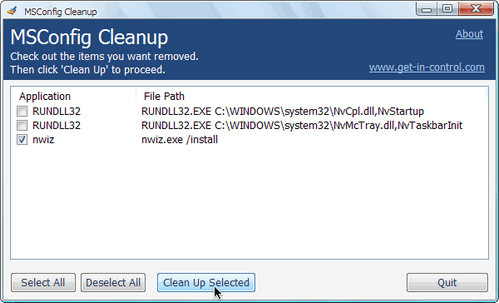
there’s a handy tool called MSConfig Cleanup Tool that can do it easily.
MSConfigCleanup

It scans the startup configurations and allows you to remove any item that has been previously disabled via MSConfig.
Just check the disabled entries you want to remove and click Clean Up Selected.
Simple as that. Try it. It’s Free!

Download MSConfig Cleanup Tool via get-in-control

Your friendly IT Technician and your go-to source for all things tech-related. With a passion for technology, I’m here to simplify your digital world and help you unlock its full potential.

Related Posts

How to Clear Your Browsers Cache and History

Clearing your browser cache and history can help improve your browsing experience, remove clutter, and enhance privacy. Here’s how to do it in some of the most popular…

Phone as Modem Without PC Suite/OVI Suite

I just want to share this to all that uses their phone as modem in their PC’s this is what I used before when i didn’t have a…

Rename Recycle Bin Option for Windows XP

I wanted to share you an old tweak i have long time ago, a tweak in how to rename a recycle bin in windows xp.

LS Patch – Logoff/Shutdown Text Remover for XP

A small utility that will instantly remove the logoff/shutdown text from your Start Menu.

Delete Files Directly in Windows XP/Vista/7

This is very handy when you want to delete file(s) in Windows XP/Vista/7 that you really don’t need them anymore…

How to Quickly Turn-Off your Display

Quickly Turn-Off your monitor or display with just a simple hotkey combination..

Leave a Reply

Your email address will not be published. Required fields are marked *

This site uses Akismet to reduce spam. Learn how your comment data is processed.