Windows 8

Customize Your Windows 7 and Windows 8 Taskbar Thumbnails Preview

Part of Windows 7 new features is the Thumbnail Preview on your taskbar also known as Windows 7 Superbar. This feature is very useful when viewing window previews just by hovering your mouse into the taskbar icons.

Now, those thumbnails can be customize with the help of winaero’s Taskbar Thumbnails Tuner
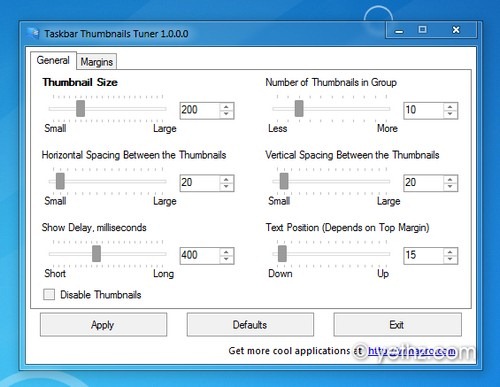
Customize Taskbar Thumbnails

Taskbar Thumbnails Tuner (Customizer) also available for Windows 8 and you can run it directly without any installation.
This portable free app allows you to:

  • Adjust thumbnails size
  • Adjust the number of thumbnails for grouped application windows.
  • Adjust horizontal spacing between the thumbnails
  • Adjust vertical spacing between the thumbnails
  • Adjust thumbnail’s caption position
  • Adjust top margin
  • Adjust bottom margin
  • Adjust left margin
  • Adjust right margin
  • Completely disable taskbar’s thumbnails.

Taskbar Thumbnail Tuner allows you to modify several settings of taskbar thumbnails in Windows 7 and Windows 8. You can adjust margins, size of thumbnails, fade in delay as well as some other options what inaccessible through default Windows settings.

Download Taskbar Thumbnails Tuner for Windows 7 & Windows 8

Share this to your friends:

Your friendly IT Technician and your go-to source for all things tech-related. With a passion for technology, I’m here to simplify your digital world and help you unlock its full potential.

Related Posts

Bring Back Start Menu in Windows 8 with Start8

We all knew that Start Menu in Windows 8 has been replaced with the new Start Screen interface, best suite on touch devices and honestly its really cool…

Tweak Mouse & Touch Gestures When Closing Metro Apps in Windows 8

In Windows 8 when closing a metro apps you will drag from top of the screen to the bottom edge of your screen. Close Threshold app can change that…

Turn Features in Windows 8

Enable .NetFramework 3.5 in Windows 8 without using Windows Update

Microsoft has already released Windows 8 Release Preview some time ago. It’s got some really good new stuff like the metro UI and ribbon explorer and some more…

Download Windows 8 Release Preview Mouse Cursors for Windows

For those who haven’t tried Windows 8 Release Preview yet, and would like to Install and use the Windows 8 Mouse Cursors that comes with it. You can…

Remove Windows 8 RP Build Information

[Update] Remove Watermark in Windows 8 Release Preview (RP) Build 8400 & Consumer Preview (CP) Build 8250

Wanted to remove the watermark or the build information on your Windows 8 Release Preview Build 8400 desktop? then try this tweak to disable or remove the watermark

Download Windows 8 Release Preview [Official Link]

Windows 8 Release Preview is already here as mentioned on microsoft blog that expected to be publish publicly on June 1, 2012.

This Post Has 2 Comments

Leave a Reply

Your email address will not be published. Required fields are marked *

This site uses Akismet to reduce spam. Learn how your comment data is processed.